


If you are already close to buying a Desktronic desk but still hesitating, that is understandable. These are not impulse purchases, and the questions that matter are usually practical: Will it wobble? Which model do I actually need? Is the warranty as strong as it sounds? What happens if something goes wrong?
This review focuses on those buying doubts. We did not personally test the desks, so manufacturer specifications, independent testing and owner reports are kept separate rather than presented as firsthand experience.
Quick Answer
Desktronic is worth considering if you want an electric standing desk with a broad model range, strong published specifications and current long-term warranty coverage. For most buyers, HomePro is the model to compare first because it gives you a wider height range, more desktop-size options and higher published lifting capacity than HomeOne without moving into HomeMax pricing.[1]
The main reasons to slow down before ordering are standing-height stability, the final configured price once accessories are added, and making sure the warranty coverage you care about applies to the component you are worried about. Public owner reports on wobble are mixed, so this is not a product we would describe as universally “zero wobble.”[6][7]
Is Desktronic a legitimate company?
Yes. Desktronic operates active U.S. and international storefronts, publishes product, warranty and support information, and has a large public customer-review footprint. Trustpilot currently shows a 4.7/5 score from more than 4,500 reviews; Trustpilot also notes that Desktronic invites customers to leave reviews.[4]
The review pattern is mostly positive around build quality, smooth height adjustment and support, but there are also complaints involving delivery delays, shipping problems and occasional product issues. That does not establish a defect rate, but it is enough reason to inspect the desk carefully when it arrives and keep your packaging until you are sure you are keeping it.[4]
Which Desktronic desk should you actually buy?
The easiest mistake is paying for more desk than your setup needs. Desktronic currently lists three main desk tiers:
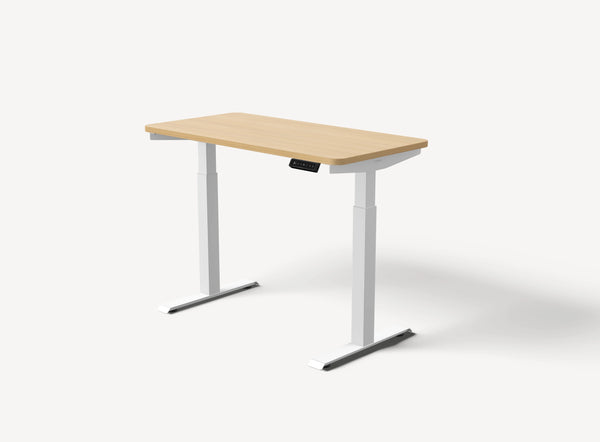
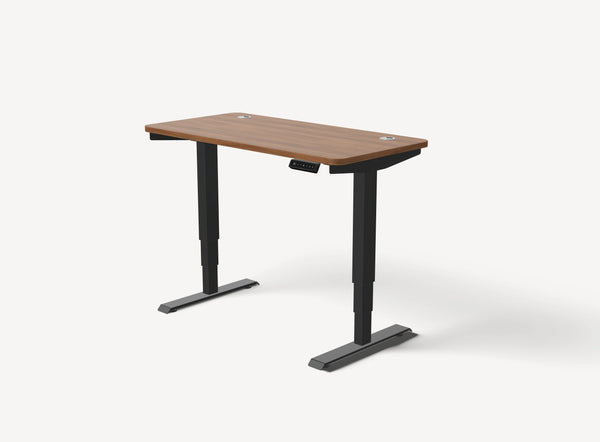
HomeOne — from $449: the simpler choice for a standard home-office setup. Desktronic lists a 28.9–47.1-inch height range with tabletop, dual motors and up to 264.6 lb of lifting capacity.[2]
HomePro — from $549: the stronger middle option. It supports larger Desktronic tops, has a 25.4–51.2-inch height range with a 1-inch tabletop, dual motors, a 2 in/s lift speed and up to 352.7 lb of published lifting capacity.[1]
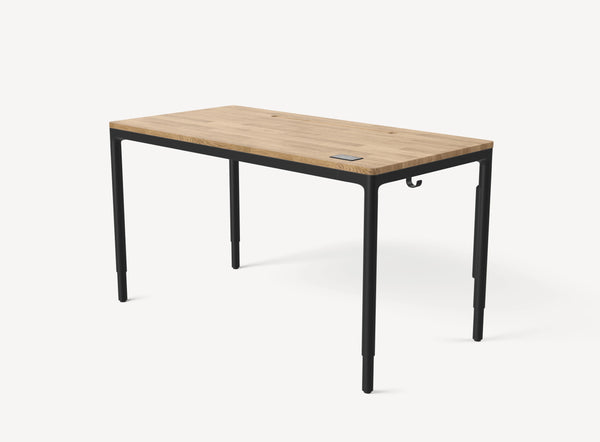
HomeMax — from $1,299: the premium four-leg option. It is the model to investigate only if the four-leg construction and premium feature set are part of what you are specifically paying for.[3]
For most buyers, HomePro is the safest place to start comparing. HomeOne makes more sense if your workspace is modest and you do not need HomePro’s extra range or larger desktop options. HomeMax becomes relevant only when you already know why you want the four-leg design.
Does the Desktronic HomePro wobble?
This is the doubt we would take most seriously before buying. Desktronic markets HomePro as a stable desk, but real-world reports are not identical across setups.[1]
One HomePro owner reported no noticeable movement while seated and only a small amount of wobble when leaning on the desk at standing height; normal typing did not cause meaningful movement in that setup.[6] Another owner using a 2-meter HomePro reported noticeable but not extreme wobble, while a more recent September 2026 post describes monitor shake during normal typing on a 160 × 80 cm HomePro setup.[7][8]
Those are individual owner experiences, not controlled testing. The useful takeaway is that desk width, standing height, flooring, monitor arms and equipment placement can all change how movement feels. If monitor shake would bother you, do not buy based on a “no wobble” expectation.
If stability is your main concern, our standing desk wobble guide explains how the frame, flooring and monitor arm can each contribute to visible movement.
Is HomePro difficult to assemble?
Probably not for most buyers, but do not assume it is completely tool-free in every configuration. Desktronic currently lists an average assembly time of about 25 minutes and describes the process as easy.[1]
The Independent assembled its test HomePro in just over 20 minutes, but noted that the desktop did not have guide or pre-drilled holes, so some alignment and DIY work was required.[5]
If you are uncomfortable lifting or positioning a large tabletop, having a second person available is the more realistic plan.
Is the 15-year warranty really 15 years?
Yes, but not every component receives 15 years of coverage. Desktronic’s warranty policy, last updated June 9, 2026, lists 15 years for specified metal and mechanical parts on its height-adjustable desks and frames purchased on or after that date. Motors and electrical components are listed at five years, and desktops are also listed at five years.[9]
That distinction matters more than the headline “15-year warranty.” If your main concern is the motor, controller or electronics, read the component-level policy rather than assuming the full desk has the same term.
What about returns and support?
HomePro’s current product page advertises free 30-day returns, and Desktronic says its support team responds to messages within one business day.[1][10]
Because a standing desk is large and difficult to repack once assembled, we would still keep the original packaging until you have checked the tabletop, controls, motors and stability at your normal sitting and standing heights.
What are buyers most likely to appreciate — and worry about?
Reasons to consider Desktronic
- HomeOne, HomePro and HomeMax cover clearly different workspace needs.
- HomePro offers a broad height range and five published tabletop sizes.[1]
- Independent testing from The Independent found HomePro straightforward to use and relatively easy to assemble.[5]
- Current Trustpilot feedback is strongly positive overall.[4]
- The warranty policy provides long coverage for specified structural components.[9]
Reasons to pause
- HomePro is not guaranteed to feel wobble-free in every standing setup.
- Accessories can increase the final workstation cost.
- Some buyers report shipping, component or support-related frustrations even though the overall review picture is positive.[4]
- The 15-year headline warranty does not mean 15 years on motors, electronics and desktops.[9]
- Large desktops and monitor-arm setups deserve extra stability consideration.
Who should buy Desktronic?
Desktronic makes the most sense if you want an electric standing desk with more size and height flexibility than a basic budget desk, you are willing to compare the final configured price rather than only the starting price, and you are comfortable with the normal stability trade-offs of a two-leg standing desk.
HomePro is the model we would investigate first if you use multiple monitors, want a larger desktop, need a lower or higher adjustment range, or simply want more room to expand your setup later.
Who should skip it?
Skip or keep comparing if you need a desk that feels completely rigid at high standing positions, if your workspace only needs a small basic desk and HomeOne’s capabilities are already more than enough, or if HomePro’s final configured price gets too close to a competitor that gives you features you value more.
HomeMax is also difficult to justify purely as an upgrade unless you specifically want the four-leg structure and premium feature set. Paying more only makes sense when the extra hardware solves a problem you actually have.
Final verdict: is Desktronic worth buying?
Yes, for the right setup. Desktronic is not a brand we would dismiss because of legitimacy or basic specification concerns. The more important decision is whether the model you are considering matches your workspace and your tolerance for the normal trade-offs of an adjustable desk.
If you want the simplest route, HomePro is the model to compare first. It offers more adjustment and desktop flexibility than HomeOne without immediately jumping to HomeMax’s premium price. But if stability at standing height is your single biggest concern, read the wobble evidence carefully and judge it against your monitor setup before ordering.
Shop the Desktronic Desks Mentioned Above
Frequently Asked Questions
Is Desktronic legit?
Yes. Desktronic operates active storefronts, publishes warranty and support information, and has thousands of public customer reviews.[4]
Is HomeOne or HomePro better?
HomeOne is the more sensible choice when its size and height range already fit your setup. HomePro becomes more relevant when you want larger desktop options, a broader height range or higher published lifting capacity.[1][2]
Does HomePro wobble at standing height?
Some owners report mild or noticeable movement at standing height, while others report stable normal typing. The amount of movement appears to depend partly on desk size, height, flooring and monitor setup.[6][8]
How long does HomePro take to assemble?
Desktronic lists an average assembly time of about 25 minutes. The Independent completed its test assembly in just over 20 minutes, although some manual alignment was required.[1][5]
Sources & References
-
Desktronic — HomePro
Current pricing, specifications, assembly estimate, dimensions, lifting capacity and return information.
View source -
Desktronic — Standing Desk Frames / HomeOne comparison
HomeOne height range, lifting capacity and current model positioning.
View source -
Desktronic — Standing Desks
Current HomeOne, HomePro and HomeMax pricing and lineup information.
View source -
Trustpilot — Desktronic Reviews
Current review score, review count and recurring customer-feedback themes.
View source -
The Independent / IndyBest — Best Standing Desks 2026
Independent HomePro assembly and practical-use observations.
View source -
Reddit r/StandingDesk — HomePro owner review
Anecdotal owner experience concerning normal-use stability, standing-height movement and flooring.
View source -
Reddit r/StandingDesk — 2-meter HomePro discussion
Anecdotal owner reports concerning movement on wider HomePro configurations.
View source -
Reddit r/desksetup — HomePro monitor-shake report
Recent anecdotal report of monitor and desk movement during typing on one HomePro setup.
View source -
Desktronic — Warranty Policy
Current component-level warranty periods for desks purchased on or after June 9, 2026.
View source -
Desktronic — Contact & Support
Current support contact information and stated response time.
View source
 ✓
✓